
GeoDiff - Intro
GeoDiff is a land-surface segmentation system built around satellite map tiles, asynchronous workers, and a web interface for viewing processed results.
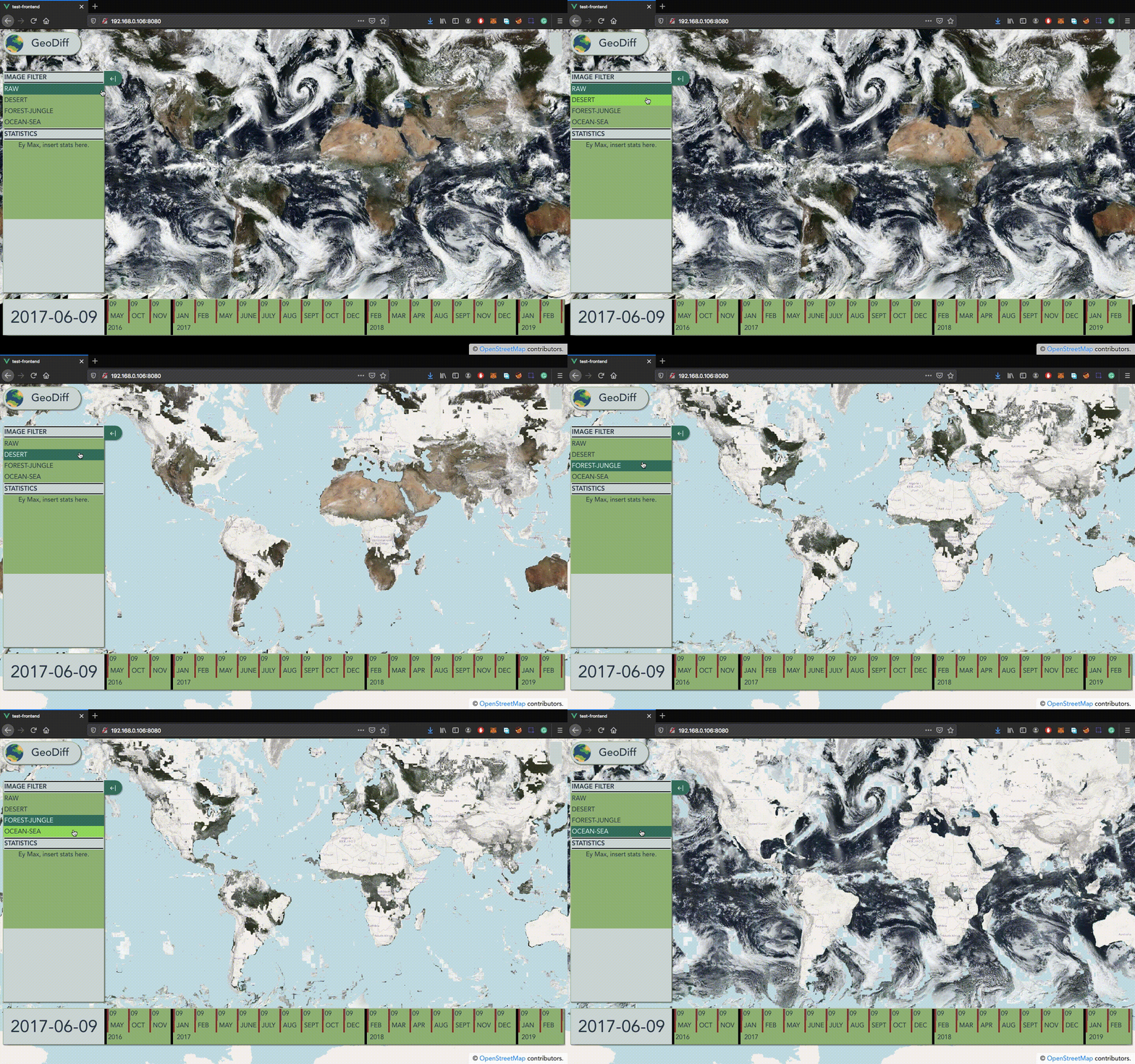
Demo
Getting Started
This section describes how to run the project locally. Start with the installation steps below.
Prerequisites
Install Docker and Docker Compose.
You also need to download the tiles, which are the map images processed by the system. You can skip the full download and use the smaller sample tiles located in test-data/tiles-mini.
Tip: it is useful to store the extracted tiles path in an environment variable because it is reused later:
export TILES="/home/tiles"
Docker Installation
Clone the repository:
git clone https://github.com/mrgrassho/geo-diff-2
After installing Docker, enable swarm mode:
docker swarm init
Create the volume used to store tiles. The device value must point to the directory where the tiles were extracted. If you assigned that path to $TILES, you can run the command below directly. Otherwise, replace $TILES with the absolute path to the tile files.
docker volume create --driver local \
                    --opt type=none \
                    --opt device=$TILES \
                    --opt o=bind tiles-data
Note: make sure the tile directory is not owned by
root. If needed, runchown YOUR_USER:YOUR_USER $TILES.
Build and deploy the web stack to Docker Swarm. The setup script is located in the services directory:
./set_up_stack.sh docker-compose-web.yml geo-diff-web
Build and deploy the work stack:
./set_up_stack.sh docker-compose-work.yml geo-diff-work
AWS Deployment
Using AWS, we successfully deployed both stacks. The AWS guide explains how the instances and firewall groups were configured, discusses the availability of the current setup, and outlines possible improvements.
Documentation
System Architecture
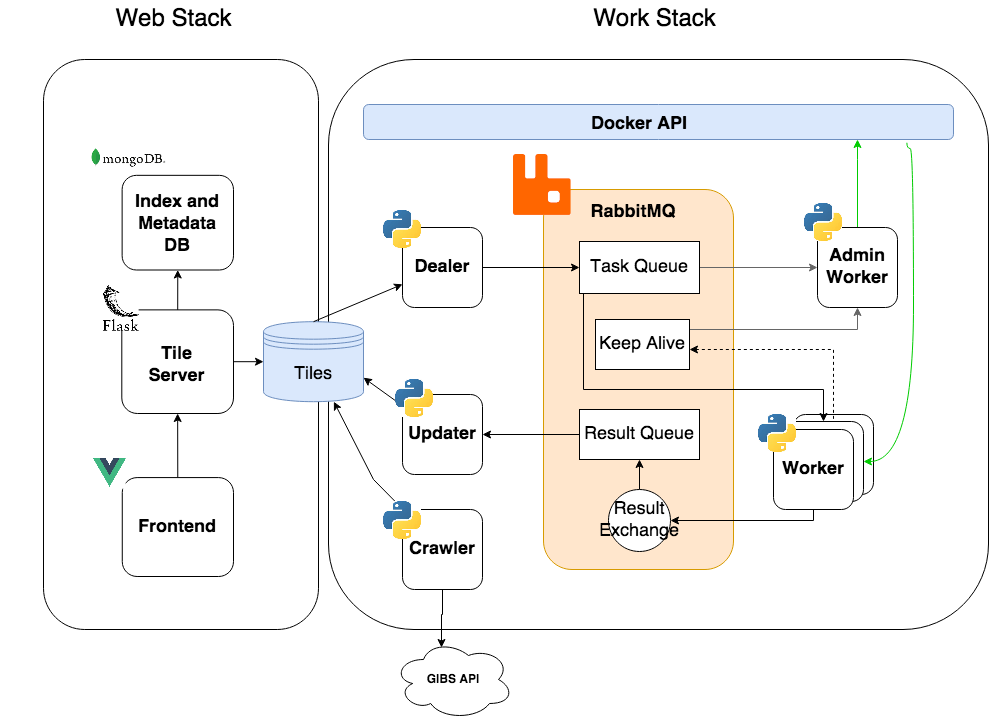
Web Stack
| Application | Role |
|---|---|
| MongoDB | Non-relational database |
| Mongo-Express | MongoDB administration UI |
| Backend | Tile server built with Flask |
| Frontend | Web UI built with VueJS |
Work Stack
| Application | Role |
|---|---|
| RabbitMQ | Message broker |
| Crawler | Downloads tiles |
| Updater | Updates results processed by workers |
| Dealer | Distributes tasks to workers |
| Worker | Processes tasks |
| Admin-Worker | Manages workers, keeps them alive, and performs worker autoscaling. This container has Docker API access, allowing it to create and remove workers on demand. |
Queue Architecture
The message broker has three queues:
| Queue | Role |
|---|---|
| Task Queue | Feeds work to the workers. Each worker takes images to process from this queue. |
| Result Queue | Temporarily stores results returned by workers until the updater consumes and dequeues them. |
| Keep Alive | Used by each worker to notify the admin worker that it is still running. |
Resources: Images
The main input for the system is the raw tile dataset: satellite images in XYZ tiled web map format that are processed by the work stack.
GIBS API
The resources are provided by NASA through the GIBS API. The API supports different access formats. For this project, we used the generic XYZ tiled web map access pattern because it is the simplest option for crawling JPEG/PNG tiles.
Docker Volume
A Docker volume is used to share results between both stacks. It acts as a filesystem abstraction, allowing the web stack and work stack to run independently from each other.
Built With
- RabbitMQ - Message broker
- Flask - Python micro web server
- MongoDB - NoSQL database
- VueJS - Progressive frontend framework
- OpenLayers - Map rendering
Performance - Work Stack
Localhost Analysis
The localhost performance report details several tests using different configurations for the parameters that affect scaling in the work stack. The main goal was to find the optimal number of workers for the available hardware. These tests were performed on a Dell XPS with Ubuntu 20.04 LTS using the provided resources: roughly 1.2 GB of tiles.
Cloud Analysis: AWS
The AWS analysis evaluates different cluster configurations and studies performance under several operating conditions. The main goal was to define suitable parameters while maximizing the available resources. The report also covers hardware types, the parameters that modify cluster behavior, and the advantages of using cloud services for this type of project.
The AWS tests were performed with five t2.micro instances: 3.3 GHz Intel Xeon, one core, 1 GB RAM, and 8 GB storage per instance.
All instances used 8 GB of storage except the
manager/admin, which used 30 GB.
Repo
The source code for this project is available on GitHub.